
Conditionals
In everyday life, we make decisions based on different situations. Such as “If we are hungry, then we get a snack” or “If we are tired, we go to bed”. Often in code, we want our program to do something similar and make different decisions based on different situations. When programming a robot, one example could be “If the timer starts, drive the robot for 5 seconds then stop when the timer reached 15 seconds. To add decisions to our code, we use conditionals.
This section will cover three types of conditionals which are:
- if
- else
- else if
There is also another type of conditional, called switch, but we will not be covering it in this section because it is not used as frequently in FRC programming. However, if you want to learn more about the switch statement, you can learn more on w3school’s page on
which covers this type of conditional.
Like we mentioned earlier in Java Fundamentals , all programming languages have syntax that needs to be followed.
One part of syntax is keywords.
As a reminder, a keyword is a reserved word that the compiler uses to run the code.
In Java, we use the following keywords for conditionals: if, else if, else
An if statement is a basic conditional.
The syntax for an if statement is as follows:
if (condition) {// code to run when condition is true}Let’s break down what this means:
ifis a keyword( )holds the condition that is either true or false. Example: (6 > 2) is a condition and it is true because 6 is greater than 2{an open curly braces is used to denote the opening of the conditional}a closed curly braces is used to denote the end of the conditional
The code in between the opening and closing curly braces are called a “code block”. A code block a sequence of code that is enclosed in curly braces.
All conditionals follow a very similar syntax. They all start with a keyword, most are followed by parentheses, and they all have an opening and closing curly braces.
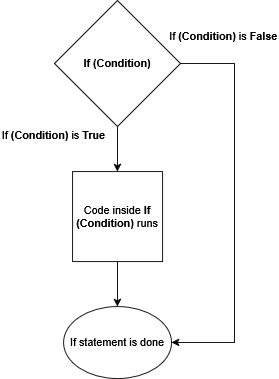
if statements can make decisions based on the condition inside the parentheses.
If condition is true, the code inside the if block will run.
If condition is false, the code inside the if block will be skipped.
This is also described in the flowchart below
Now let’s look at an example. In this example, pretend that we have a robot with a distance sensor on it. A distance sensor detects and reports how far or how close the robot is to an object. We want our robot’s drivetrain motors to keep spinning until the robot is 10cm away from an object. Our robot is currently 6cm away. Looking at the example below, what should happen?
double distance = 6;if (distance < 10) { System.out.println("Motors are spinning"); drivetrain.setThrottle(1); // runs the motor at full speed}The condition is distance < 10.
We know distance is equal to 6, therefore we can think of the condition saying 6 < 10. 6 is less than 10 which makes the condition true.
This means the code inside the if block runs, which prints “Motors are spinning” and the spins the motors at half speed.
When making decisions, sometimes there isn’t a need for precise logic.
Sometimes you don’t want to (or can’t) determine the other possibilities that can be true and it would be better to encompass everything in a “catch all” type statement.
For example: The robot keeps driving until distance is at 10, then stop.
This is one example where we could use an else statement.
The syntax for an else statement is as follows:
if (condition) {// block of code to be executed if the condition is true} else {// block of code to be executed if the condition is false}else statements do not have parentheses because they do not need a condition to decide if they should run or not.
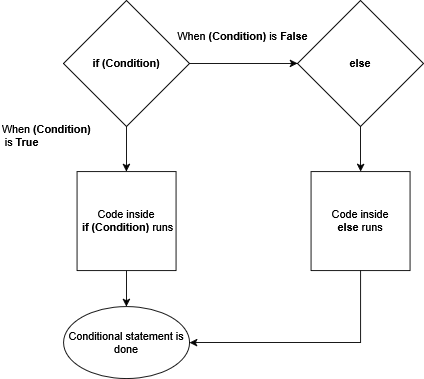
Here’s how this works: if theif statement’s condition is true, then the the code inside will run.
If the if statement’s condition is false, the if block will be skipped, and the code inside the else block will run.
This is also described in the flowchart below
In this example, we now have an else statement that sets the motor speed to 0 if distance is greater than 20. Since our distance is set to 21, what would the code print out?
distance = 21;if (distance < 10) { System.out.println("Motors are at half speed"); drivetrain.setThrottle(0.5); // runs the motors at half speed} else { System.out.println("Motors are not spinning"); drivetrain.setThrottle(0); // stops the motors}We check the first conditional distance < 10.
21 is not less than 10 so we skip that conditional and go to else.
The else runs and it prints out “Motors are not spinning”, and the motors are set to 0.
else if
Section titled “else if”Sometimes we want our code to have specific logic for multiple cases.
Often we want the robot to slow down as it approaches its target.
Let’s say we want the robot to drive at half speed when it’s 5cm away from its target.
This can be done by adding an else if statement.
The syntax for an else if statement goes as follows:
if (condition_A) {// code to run when condition_A is true} else if (condition_B) {// code to run when Condition_B is true}The syntax is similar to an if statement but now it has else if at the end.
Let’s break down what this new addition means.
else if is a keyword that allows the conditional to run a different task if the if statement is false.
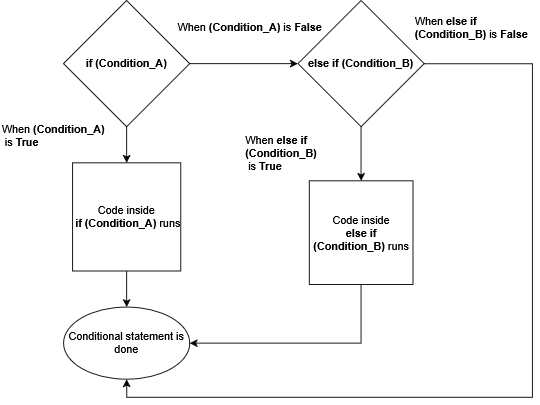
If condition_A is true then the code inside the if block will run.
If condition_A if false, then it will go to the else if statement.
If condition_B is true, the code inside the else if block will run.
If condition_B if false, then it will exit the statement and none of the code will run.
This is also described in the flowchart below
In the example, we now have an else if statement that sets the motor to half speed if the distance from an object is less than 10cm.
Our distance is now 15cm.
With the new addition, what would the code print out?
distance = 15;if (distance < 10) { System.out.println("Motors are half speed"); drivetrain.setThrottle(0.5); // runs the motors at half speed} else if (distance > 10) { System.out.println("Motors are at full speed"); drivetrain.setThrottle(1); // runs the motors at full speed}The distance is 15cm away.
The first condition is distance < 10.
15 is not less than 10, which means that condition is false.
Therefore we go to the next part of the conditional which is the else if.
The else if has the condition distance > 10.
15 is greater than 10 so the code inside this else if block runs.
This means the motors are set to drive at full speed and “Motors are at full speed” gets printed to the terminal.
Putting Everything Together
Section titled “Putting Everything Together”Our code above has the robot drive at full speed if the distance is greater than 10cm, and drive at half speed if the distance is less than 10cm, but it doesn’t stop if it reaches its target distance. You could add another else if, or you could put everything that we learned above together and add an else conditional.
distance = 21;if (distance < 10) { System.out.println("Motors are at half speed"); drivetrain.setThrottle(0.5); // runs the motors at half speed} else if (distance <= 20) { System.out.println("Motors are at full speed"); drivetrain.setThrottle(1); // runs the motors at full speed} else { System.out.println("Motors are not spinning"); drivetrain.setThrottle(0); // stops the motors}We check the first conditional distance < 10.
21 is not less than 10 so we skip that conditional and go to the else if.
This conditional has distance <= 20, we know 21 is not less than or equal to 20 so we skip this conditional.
Since the two conditionals were false, this means the else runs and it prints out “Motors are not spinning”, and the motors are set to 0.
Conditional Exercise
Section titled “Conditional Exercise”WIP